Risk Assessment Management, Made Easier
- Assess. Update. Approve. Issue
- One Dashboard for you and one Portal for your clients
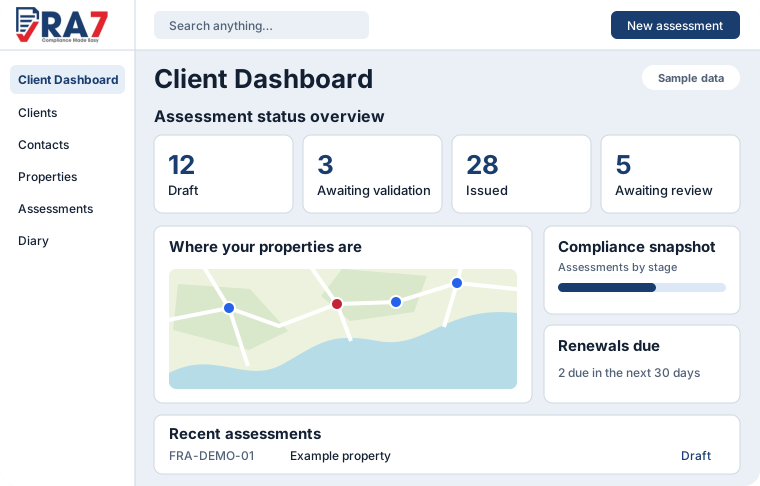
- You manage your FRA business in your Dashboard
- Your clients view FRAs, manage tasks and can schedule appointments in their own Portal
RA7 is a highly secure cloud platform that covers the full assessment lifecycle. It includes optional Ai connectivity & an eCommerce option to capture client payments for those that want to use it.
RA7 is suitable for sole traders, medium sized teams and multi area large Risk Assessment Companies
From fieldwork to final report, RA7 connects the workflow so your team spends less time administering assessments and more time delivering professional work.
Work anywhere
Designed for mobiles and tablets, with offline working so assessors can keep working when connectivity disappears.
Control every assessment
Create, edit, review and approve assessments using structured templates, consistent workflows and clear permissions.
Keep clients moving
Deliver completed assessments through a secure client portal and turn identified risks into trackable actions.
Key features
RA7 has a range of features that will be useful to any sized Fire Risk Assessment business, no matter the size complexity or location.
- Ultra modern and easy to use Dashboard and end Client Portal.
- Highly flexible Workflow suitable for any business.
- Includes standard FRA template set plus the ability to create your own unlimited templates.
- Easy to use and comprehensive form builder.
- Secure data handling and role-based access.
- Optional eCommerce and Ai integration for those that need it.
RA7 has many more features than shown on this page, click here to view the full list.
The RA7 approachA simple but effective workflow from site visit to PDF delivery via the end Client Portal.
Assess
Complete assessments using your approved templates, including field-based and offline workflows on Desktops and Mobile devices.
Update
Update assessments in the field or office, and upload photos and videos from your mobile device.
Manage
You or your office staff can access uploaded assessments as soon as they are complete, reducing time spent and costs.
Your Dashboard
Track and manage all aspects of your FRAs in your own Dashboard. Various statistics are available to you via a widgetised dashboard.
Your Client Portal
Your clients can view FRAs, Pay for FRAs, view and manage tasks and view and schedule appointments with you with complete control over availability.
Make assessment management easier for your whole team.
See how RA7 can fit your current workflow, templates and client journey.